
Overview
Assumptions
Suitable for organizations with aging access control systems that need to upgrade without disrupting operations, targeting IT managers, security managers, and experienced integrators.
Core Value
Solves the problem of aging access control systems that cannot meet current security requirements or integrate with modern systems.
Avoids the disruption of a complete system replacement while achieving the security and management improvements of a modern system.
Provides a structured migration path that preserves existing investments while enabling modern capabilities.
Guide Structure
Product Overview
What is this solution?
Access control system upgrades are among the most complex projects because they must maintain security continuity during migration. The challenge is managing the transition from legacy credentials (Wiegand cards) to modern credentials (OSDP, mobile), from on-premises servers to cloud platforms, and from isolated systems to integrated security management, all while keeping doors operational.
Key Capabilities
Phased Migration Planning
Structured migration plan that maintains security continuity throughout the upgrade.
Legacy System Compatibility
Bridges between legacy and modern systems during transition period.
Credential Migration
Manages transition from legacy credentials to modern credentials without disruption.
Data Migration & Audit
Migrates access records, permissions, and user data to new system with verification.
Value by Role
Phased migration reduces risk and allows validation at each stage.
Security continuity during migration is non-negotiable; plan for it explicitly.
Phased migration minimizes operational disruption compared to big-bang replacement.
Migration projects require deep knowledge of both legacy and modern systems.
Selection Method
Selection Framework
Use the following decision steps to determine if this solution fits your project. Each step narrows the selection scope and identifies key risk areas.
Legacy system assessment is the most critical first step; do not skip it.
Security continuity during migration must be explicitly planned, not assumed.
Phased migration is almost always better than big-bang replacement for access control.
When budget is limited, prioritize high-security areas for early migration.
Quick Decision Rules
If your project has more than 3 sites or 100+ door points, prioritize platform scalability over device cost.
If personnel turnover is high, ensure the permission revocation workflow is automated, not manual.
If the area is high-security (server room, pharmacy), require dual-factor authentication as a minimum.
If integration with HR or attendance systems is required, verify API compatibility before procurement.
Application Scenarios
Applicable Scenarios
Organizations with aging Wiegand-based access control systems
Facilities migrating from on-premises to cloud-based management
Organizations consolidating multiple legacy systems into a unified platform
Facilities upgrading from card-only to multi-credential access
Scenario Characteristics
Personnel Structure
Evaluate the complexity of personnel types, turnover rate, and permission granularity requirements.
Security Level
Determine authentication strength requirements based on asset value and regulatory requirements.
Growth Expectation
Consider future expansion, new sites, and system integration requirements in the selection.
Metrics & Acceptance
Key Performance Indicators
| Indicator | Minimum Standard | Enhanced Standard | Verification Method |
|---|---|---|---|
| Authentication Response Time | < 2 seconds | < 0.5 seconds | On-site timing test |
| False Rejection Rate (FRR) | < 1% | < 0.1% | 100-sample test |
| Offline Operation Duration | 4 hours | 72 hours | Power-off simulation |
| Permission Sync Latency | < 5 minutes | Real-time (< 30s) | Add/revoke timing |
| Event Log Retention | 90 days | 365 days+ | Platform query check |
| Emergency Release Time | < 10 seconds | Automatic on alarm | Fire alarm simulation |
Acceptance Checklist
Installation Conditions
Legacy system documentation must be obtained before migration planning begins.
Environment Requirements
Parallel operation period requires sufficient network and server capacity for both systems.
Commissioning Requirements
Each migration phase must be fully validated before proceeding to the next phase.
Operations Requirements
Establish rollback procedures for each migration phase in case of issues.
Common Pitfalls
Legacy system documentation is often incomplete; budget extra time for discovery and assessment.
Compare & Recommend
Tier Definition
Entry Tier
Target: Small single-site, low security requirement, limited budget
Risk: Limited scalability, manual management
Professional Tier
Target: Multi-site or medium-scale, compliance requirements, integration needs
Risk: Higher deployment complexity, requires professional integration
Enterprise Tier
Target: Large-scale, high security, multi-system integration, audit requirements
Risk: High investment, long implementation cycle
Recommended Combinations
Basic Combination
Required
- Legacy system assessment
- Migration planning documentation
- New access control platform
- Credential migration tools
Scenario: Single-site, standard security, < 50 door points
Risk: Difficult to expand later, manual permission management
Professional Combination
Required
- Legacy system assessment
- Migration planning documentation
- New access control platform
- Credential migration tools
Optional Add-ons
- Legacy-modern bridge hardware
- Parallel operation monitoring
- Credential dual-issuance system
Scenario: Multi-site or compliance-required, 50–500 door points
Risk: Integration complexity, requires professional deployment
Enterprise Combination
Required
- Legacy system assessment
- Migration planning documentation
- New access control platform
- Credential migration tools
Optional Add-ons
- Legacy-modern bridge hardware
- Parallel operation monitoring
- Credential dual-issuance system
- Data migration verification tools
- User communication plan
Scenario: Large-scale, high security, full integration, 500+ door points
Risk: High investment, long implementation, requires experienced integrator
Compatibility & Integration
System Overview
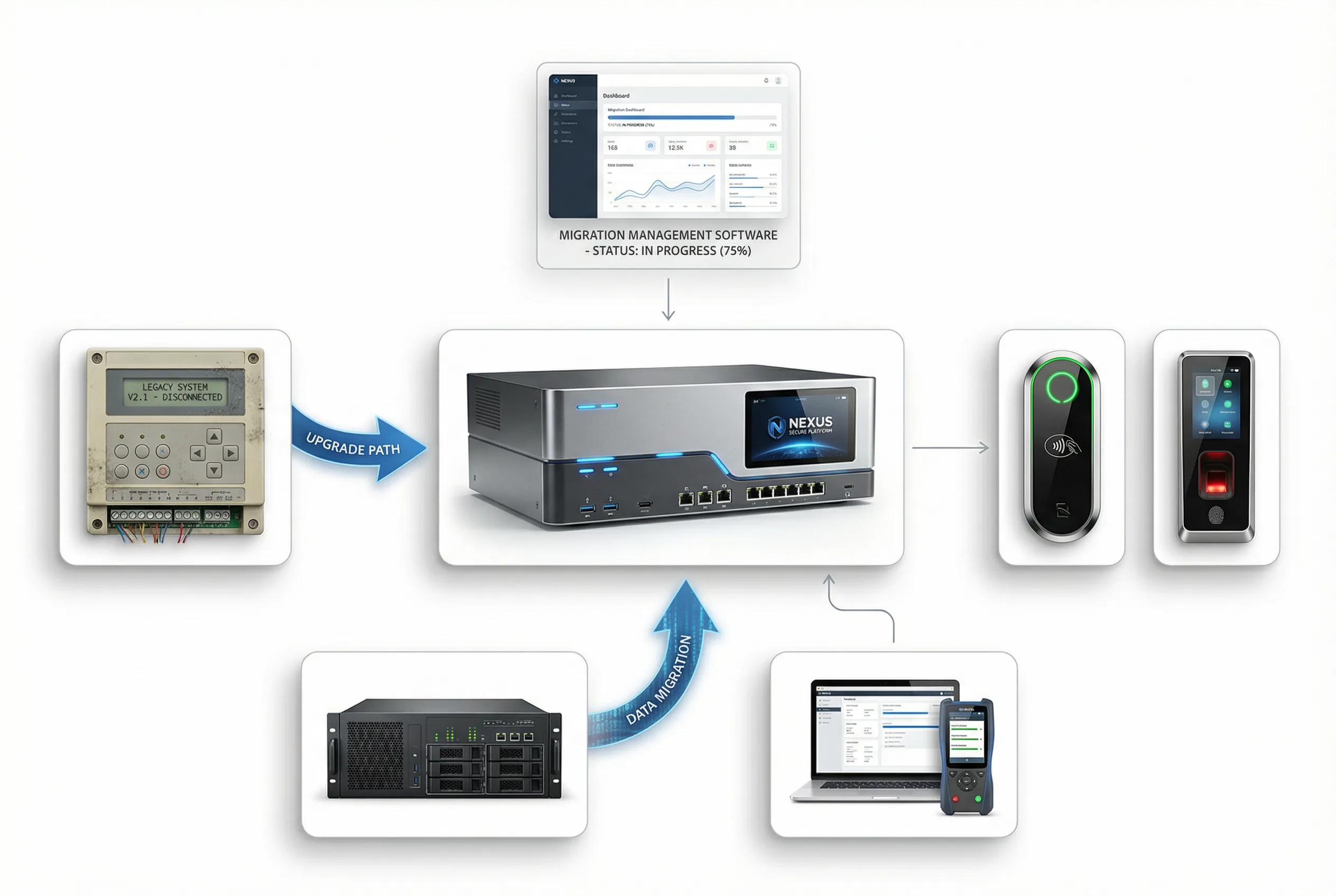
The migration involves legacy system assessment, migration planning, parallel operation period, phased cutover, credential migration, data migration, and decommissioning of legacy systems.
Integration Objects
HR / Identity Management System
Sync personnel join/leave/transfer events
Video Surveillance (CCTV/VMS)
Link access events with video evidence
Visitor Management System
Automate temporary access credential issuance
Fire Alarm / BMS
Emergency release and evacuation linkage
Attendance System
Avoid duplicate card-swiping infrastructure
Elevator Control System
Extend access control to floor-level
Integration Risks & Mitigation
Protocol mismatch between controller and platform
Consequence: Events not reported, permissions not synced
Mitigation: Verify protocol compatibility before procurement; request test environment access
HR system API changes break permission sync
Consequence: Permission residuals after personnel departure
Mitigation: Use middleware or webhook-based integration; implement daily sync audit
Fire alarm release conflicts with access control logic
Consequence: Doors fail to open during emergency, evacuation blocked
Mitigation: Define fire release priority in system design; test linkage before go-live
Network latency causes offline controller permission lag
Consequence: Revoked credentials still grant access
Mitigation: Set offline permission cache TTL; implement emergency revocation mechanism
Installation & O&M
Installation Process
- 1
Assess legacy system capabilities, limitations, and migration risks.
- 2
Develop phased migration plan with security continuity requirements.
- 3
Deploy new system in parallel with legacy system.
- 4
Migrate users and credentials in phases, validating at each stage.
- 5
Decommission legacy system after successful migration verification.
Pre-installation Risk Checklist
Confirm door frame material and lock mounting compatibility
Verify power supply capacity for all lock and controller loads
Check network connectivity and bandwidth at each door point
Confirm fire alarm integration protocol with fire system vendor
Verify cable routing path is free of interference sources
Confirm backup power (UPS/battery) runtime meets requirements
Validate reader mounting height and angle for user accessibility
Check environmental conditions (temperature, humidity, dust) for outdoor readers
Common Installation Errors
Mixing power and signal cables in the same conduit
Consequence: Electromagnetic interference causing reader malfunction
Correct Approach: Separate conduits for power and signal; maintain 30cm minimum distance
Installing readers in direct sunlight without weatherproofing
Consequence: Accelerated aging, biometric failure in high temperature
Correct Approach: Use IP65+ rated readers; add sun shade for outdoor installations
Not testing emergency release before handover
Consequence: Emergency release fails during real incident
Correct Approach: Mandatory fire alarm linkage test before project acceptance
O&M Monitoring & Maintenance
| Item | Frequency | Action |
|---|---|---|
| Door lock mechanical check | Monthly | Test lock/unlock force, check alignment |
| Controller communication status | Weekly | Check online status in platform dashboard |
| Backup power battery capacity | Quarterly | Simulate power outage, verify runtime |
| Permission audit | Monthly | Review active credentials vs. current personnel list |
| Firmware/software updates | Quarterly | Apply security patches; test in staging first |
Ready to Start Your Project?
Contact our solution team for expert access control selection advice and quotation.